---
title: "Openship — Project Dossier | Isaac Machakata | Isaac Machakata"
description: "Self-hosted deployment platform"
canonical_url: "https://isaac.co.zw/projects/openship"
meta:
author: "Isaac Munyaradzi Machakata"
"og:description": "Self-hosted deployment platform"
"og:image": "https://isaac.co.zw/_og/s/o_ea400ca939c191e1.png"
"og:image:alt": "Openship — Project Dossier | Isaac Machakata"
"og:image:height": "630"
"og:image:type": image/png
"og:image:width": "1200"
"og:title": "Openship — Project Dossier | Isaac Machakata"
"twitter:description": "Self-hosted deployment platform"
"twitter:image": "https://isaac.co.zw/_og/s/o_ea400ca939c191e1.png"
"twitter:image:alt": "Openship — Project Dossier | Isaac Machakata"
"twitter:title": "Openship — Project Dossier | Isaac Machakata"
---
> Index of every page on this site: [llms.txt](https://isaac.co.zw/llms.txt)
[← Curriculum Vitae](https://isaac.co.zw/#projects)/ [ Projects](https://isaac.co.zw/projects) /#Openship
**open-source** Public Repo active
# **Openship**
Codename: **#Openship** · Repository: **immachakata/openship**
[Visit Live Deployment (github.com/oblien/openship/pulls?q=is%3Apr+author%3Aimmachakata)](https://github.com/oblien/openship/pulls?q=is%3Apr+author%3Aimmachakata) [View on GitHub](https://github.com/immachakata/openship)
Primary Language**TypeScript**
Last Updated**Nov 1, 2026**
Created**Sep 20, 2026**
Branch / Size**main · 150.1 MB**
## **Executive Summary **
Self-hosted deployment platform
## **GitHub Codebase Language Breakdown **
**TypeScript**93.5%
**MDX**4%
**Shell**0.8%
**CSS**0.5%
**JavaScript**0.5%
**Lua**0.2%
**PLpgSQL**0.2%
**Go**0.2%
**Python**0.1%
**Dockerfile**0.1%
**PowerShell**0%
**XSLT**0%
**Java**0%
**Kotlin**0%
**Rust**0%
**PHP**0%
**C#**0%
**Sieve**0%
## **Repository Documentation (README.md) **
Fetched from GitHub
# Openship
[Permalink: Openship](#openship)
Open-source, self-hostable deployment platform with built-in CI/CD.
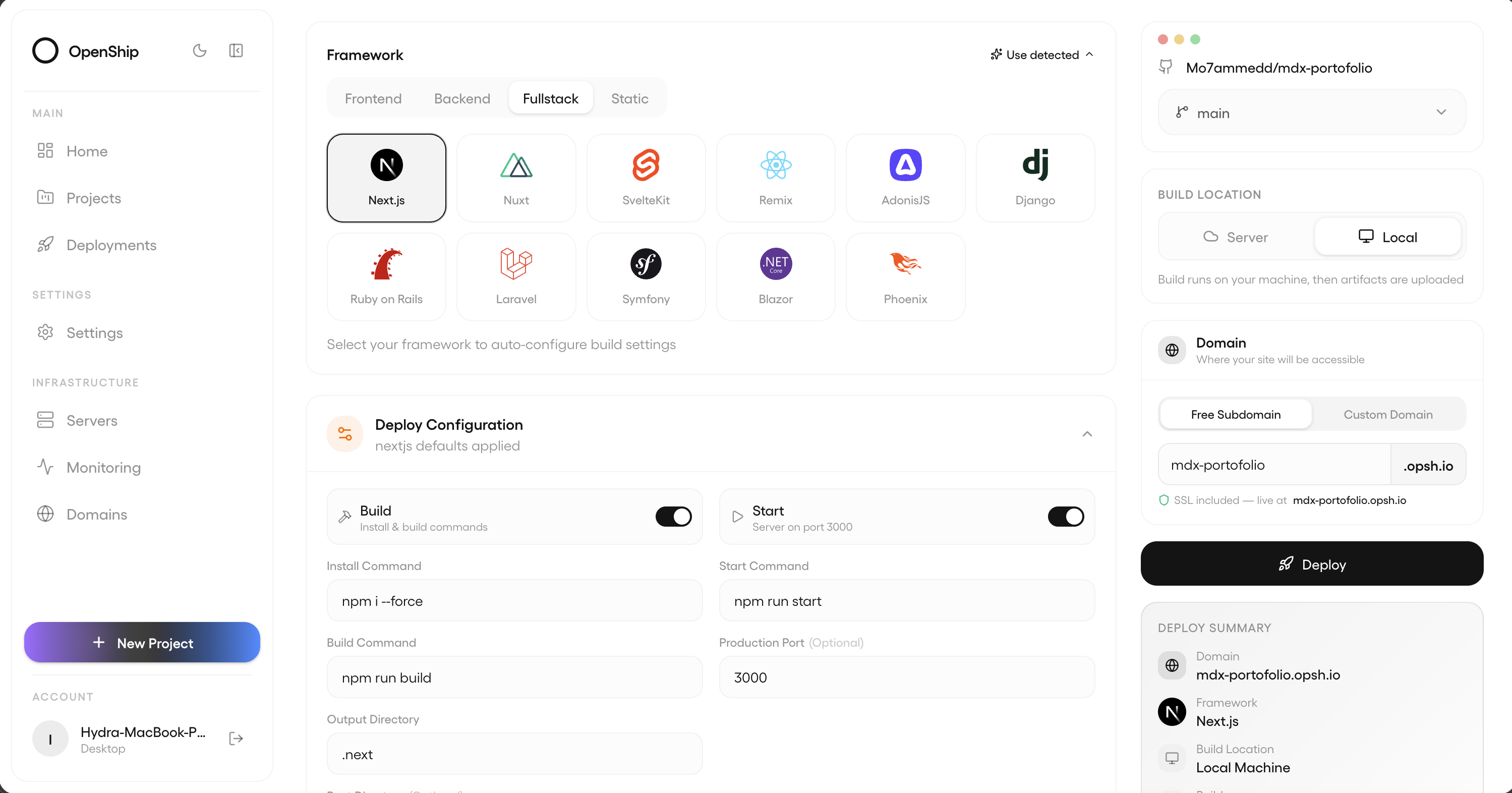
Point it at a repo — it builds, ships, routes, and TLS-terminates your app. Drive it from a desktop app, web dashboard, or CLI.
[](https://trendshift.io/repositories/38817)
[](https://www.npmjs.com/package/openship) [](https://github.com/immachakata/openship/blob/main/LICENSE) [](https://openship.io)
[Quick Start](#quick-start) · [How It Works](#how-it-works) · [Interfaces](#interfaces) · [Docs](https://openship.io/docs) · [Contributing](https://github.com/immachakata/openship/blob/main/CONTRIBUTING.md)
[](https://github.com/immachakata/openship/blob/main/README.md) [](https://github.com/immachakata/openship/blob/main/docs/i18n/README.ar.md) [](https://github.com/immachakata/openship/blob/main/docs/i18n/README.zh.md) [](https://github.com/immachakata/openship/blob/main/docs/i18n/README.es.md) [](https://github.com/immachakata/openship/blob/main/docs/i18n/README.fr.md) [](https://github.com/immachakata/openship/blob/main/docs/i18n/README.ja.md) [](https://github.com/immachakata/openship/blob/main/docs/i18n/README.pt.md) [](https://github.com/immachakata/openship/blob/main/docs/i18n/README.de.md) [](https://github.com/immachakata/openship/blob/main/docs/i18n/README.tr.md) [](https://github.com/immachakata/openship/blob/main/docs/i18n/README.ko.md) [](https://github.com/immachakata/openship/blob/main/docs/i18n/README.ru.md)
[](https://github.com/immachakata/openship/blob/main/docs/screenshots/screen.png)
---
## Quick Start
[Permalink: Quick Start](#quick-start)
There's one decision to make first: **how you run Openship itself** (the control plane). Everything else is the same afterwards.
| If you're… | Run Openship as | Where your apps run |
| --- | --- | --- |
| **Solo, one machine, no ops** | **Desktop app** | A server you connect over SSH, or Openship Cloud |
| **A team — or you want push-to-deploy / to host apps on your own box** | **Self-hosted server** (`openship up`) | On that box (Compose mode) — or out to another server / Cloud (bare mode) |
| **Not interested in running anything** | **Openship Cloud** | Managed sandboxes, zero setup |
Tip
**Solo? Use the desktop app.** It runs Openship's control plane on your own machine *only while the app is open* — nothing is left running on an always-on server, nothing is exposed publicly. You only need an always-on server install once you want **push-to-deploy (CI/CD)**, **team access**, or to **host apps on that box** — the things that need a public, always-on endpoint.
### Solo — desktop app
Permalink: Solo — desktop app
The control plane runs locally and drives your servers over SSH. No login, no terminal, no public surface — download, open, done:
| Platform | Download |
| --- | --- |
| **macOS** (Apple Silicon) | [Openship-arm64.dmg](https://github.com/oblien/openship/releases/latest/download/Openship-arm64.dmg) |
| **macOS** (Intel) | [Openship-x64.dmg](https://github.com/oblien/openship/releases/latest/download/Openship-x64.dmg) |
| **Windows** | [Openship-win32-x64.zip](https://github.com/oblien/openship/releases/latest/download/Openship-win32-x64.zip) |
| **Linux** | [Openship.AppImage](https://github.com/oblien/openship/releases/latest/download/Openship.AppImage) |
Linux: `chmod +x Openship.AppImage && ./Openship.AppImage`. Already have the CLI? `openship install` fetches and launches it. Links always point at the newest release.
From the desktop app you connect a server (SSH) or Openship Cloud and deploy to it — the app itself doesn't host public apps on your laptop.
### Team / always-on — self-hosted server
Permalink: Team / always-on — self-hosted server
Install the CLI (it bundles the API + dashboard), then run **`openship`** — an interactive wizard creates the first admin, wires your domain, and installs Openship as a boot service. Run it again anytime to manage the instance.
```
curl -fsSL https://get.openship.io | sh # install (or: npm i -g openship — needs Node 22+)
openship # guided setup, then control panel
```
The install script brings its own Node when your system one is older than 22; a package-manager install runs on the Node you already have.
For CI / headless boxes, skip the wizard and drive `openship up` directly:
```
openship up # install + start as a background service (boots + auto-restarts)
openship up --public-url https://openship.example.com # + serve the dashboard on your domain (edge + TLS handled)
```
**`openship up` picks how it runs for you:**
- **On Linux with Docker → Compose mode** (the default). Brings up the full stack — Postgres, Redis, API, dashboard, and a containerized **OpenResty edge on :80/:443** — from published images. This is the flavor that **hosts your deployed apps on the same box**, with automatic domains + Let's Encrypt TLS. Force it with `--compose`.
- **Everywhere else → bare mode** (macOS, Windows, or Linux without Docker). A single lightweight process with an embedded database — an always-on control plane that **deploys apps out to a server (SSH) or Cloud**, like the desktop app but always on and login-required. Force it with `--bare`.
A self-hosted instance **always requires login** (the admin you create in setup). `openship open` opens the dashboard · `openship stop` stops it · `openship update` upgrades · `openship up --foreground` runs attached.
> **Preview an unreleased build (dev).** To run the CLI built straight from source — a branch, tag, or `main` ahead of the next release — install the from-source build:
>
> ```
> curl -fsSL https://get.openship.io/dev | sh # main (default)
> curl -fsSL https://get.openship.io/dev | OPENSHIP_REF=dev sh # a branch/tag (var goes on sh, not curl)
> openship-dev # same CLI, built from source
> openship-dev update # pull latest source + rebuild (no release needed)
> ```
>
> It installs as a **separate `openship-dev`** command with its own isolated home (`~/.openship-dev`) and boot service, so your production `openship` and its data are never touched. Needs Bun + git; it's an unverified dev build (the dashboard compile wants real RAM/CPU) — not a production path.
**Deploy a project:**
```
cd your-project
openship init # link this directory to a project
openship deploy
```
Full server guide + complete CLI reference: **[openship.io/docs](https://openship.io/docs)**.
Shell completion (bash/zsh/fish)
Two ways to enable Tab-completion for openship:
| | Setup | Trade-off |
| --- | --- | --- |
| **Static file** (recommended) | openship completion <shell> > <path> | Instant shell startup. Regenerate after upgrading to pick up newly added commands. |
| **Live-sourced** | add source <(openship completion <shell>) to your shell config | Always reflects the currently installed version. Adds a small delay to every new shell session. |
**Static file:**
```
openship completion bash > /etc/bash_completion.d/openship
openship completion zsh > ~/.zsh/completions/_openship
openship completion fish > ~/.config/fish/completions/openship.fish
```
Open a new terminal — done.
**Live-sourced** (zsh example):
```
echo 'source <(openship completion zsh)' >> ~/.zshrc
```
Self-host with raw Docker Compose (no CLI)
The self-hosted stack lives in **docker/docker-compose.yml** and **pulls** published images from GitHub Container Registry (ghcr.io/oblien/*) — no build tooling, no monorepo compile. Run it from the repo root:
```
git clone https://github.com/oblien/openship.git && cd openship
cp .env.example .env # then edit
docker compose --env-file .env -f docker/docker-compose.yml up -d
```
The stack is **postgres + redis + api + dashboard + edge**. The edge is OpenResty on **:80/:443** as a container (network_mode: host) — routing + Let's Encrypt, no bare host install. **Linux only** (host networking); on mac/win use openship up (bare). The api container mounts the host Docker socket so the control plane can build + run your apps as host containers — it's host-privileged through the socket, so run it only on a trusted host.
**Upgrade:** pin OPENSHIP_VERSION in .env for reproducible pulls, then docker compose --env-file .env -f docker/docker-compose.yml pull && … up -d. openship update only reconciles a stack the CLI installed, and openship up would *adopt* this one — don't reach for either here. **Build from source instead:** add -f docker/docker-compose.build.yml … up -d --build.
**Host operations** (:80/:443 takeover, the mail engine, host terminal/port scans) need the container→host SSH channel, which openship up provisions and this path does not — the five manual steps are in .env.example under *Host operations from the container*, and the failure it produces is Troubleshooting → Host control channel. Everything else, including deploys, works without it.
> The **root** docker-compose.yml is a different file: it's the SaaS / from-source **control plane** (builds from source, ships the marketing site, no edge/socket). It does **not** self-host your apps — use docker/docker-compose.yml above or openship up.
---
## How It Works
[Permalink: How It Works](#how-it-works)
Point Openship at a source — a **GitHub repo**, a **local folder**, or a **prebuilt artifact** — and it runs one pipeline end to end:
1. **Detect.** It reads your `package.json`, framework config, lockfiles, and any `docker-compose.yml` / `openship.json` to work out the stack, package manager, build/start commands, and port. Zero config files required; an `openship.json` overrides the guesses if you want control.
2. **Build.** On the target server or locally on the orchestrator, into a Docker image or a bare release. The resolved config is frozen into a snapshot, so redeploys and rollbacks re-run *exactly* what shipped.
3. **Run.** As a container (published on loopback only — never a public port) or a supervised host process.
4. **Route + secure.** The OpenResty edge writes a reverse-proxy vhost to your domain and issues a Let's Encrypt certificate (HTTP-01). Because routing and TLS happen *after* the app is up, a DNS or cert hiccup surfaces as "action required" — it never fails the deploy or takes your app down.
5. **Push-to-deploy.** A GitHub webhook re-runs the pipeline on every push to the tracked branch — rebuilding only the services a monorepo push actually touched.
Databases, domains, SSL, CDN, mail, and backups are managed from the same place. (Push-to-deploy and public domains need an always-on server or Cloud — a desktop/loopback instance has no public endpoint to receive webhooks.)
---
## Interfaces
[Permalink: Interfaces](#interfaces)
Choose how to work with OpenShip:
- **Desktop app** — full GUI, real-time logs, one-click everything. Best for solo.
- **Web dashboard** — the same UI in the browser, built for teams.
- **CLI** — scriptable and CI-friendly; also how you install and manage a self-hosted instance.
- **Ship SDK** — deploy and manage resources from JavaScript or TypeScript. Connect to an existing instance with `OpenshipClient`, or embed the engine with `createShip`. Install with `npm install openship` (0.8.0+, Node.js 22+) and follow the [SDK guide](https://openship.io/docs/api/sdk).
An **MCP** endpoint (for AI agents) and a **REST API** round it out for automation. Only routes that opt in are exposed as MCP tools, every call re-checks your permissions, and credential/token routes can never become tools. Full reference at [openship.io/docs](https://openship.io/docs).
Note
The docs are actively being filled out. If something's missing or unclear, [contributions](https://github.com/immachakata/openship/blob/main/CONTRIBUTING.md) are hugely welcome.
---
## Features
[Permalink: Features](#features)
| | |
| --- | --- |
| **Built-in CI/CD** | Push-to-deploy, preview environments, staging/prod flows, rollbacks |
| **Any stack** | Node, Python, Go, Rust, PHP, Ruby, Java, .NET, Docker, monorepos |
| **Full backend** | Postgres, MySQL, MongoDB, Redis, workers, WebSockets, storage |
| **Domains & SSL** | Automatic Let's Encrypt, wildcards, unlimited domains, auto-renewal |
| **CDN** | Edge caching, HTTP/3, Brotli compression, instant purge |
| **Mail server** | Built-in SMTP with DKIM/SPF/DMARC — no Mailgun or SES needed |
| **Backups** | Scheduled, databases + volumes, one-click restore, export anytime |
| **Real-time monitoring** | Live build logs, container metrics, visitor geography and per-code response mix — [\~1.4 µs per request, zero DB writes per request](https://github.com/immachakata/openship/blob/main/docs/monitoring.md) |
| **Scaling** | Auto-scaling on cloud, multi-node ready on self-hosted |
| **Portability** | Standard Docker containers — move between providers freely |
| **Docker Compose** | Deploy existing compose files as-is |
---
## Deploy Anywhere
[Permalink: Deploy Anywhere](#deploy-anywhere)
- **Openship Cloud** — managed, auto-scaling, zero setup
- **Any VPS** — Hetzner, DigitalOcean, Linode, OVH, and the rest
- **Dedicated servers** — bare metal, colo, homelab
- **Multi-server** — spread workloads across machines
Same interface regardless of where you deploy.
---
## Status
[Permalink: Status](#status)
Production-ready core, actively developed. Self-hosting is **free** (no billing).
**Coming next:** multi-node clusters, load-balancing UI, private networking, advanced monitoring, and visual CI/CD pipelines.
---
## Contributing
[Permalink: Contributing](#contributing)
See [CONTRIBUTING.md](https://github.com/immachakata/openship/blob/main/CONTRIBUTING.md).
---
## Security
[Permalink: Security](#security)
Found a vulnerability? We welcome your report — please disclose it **privately**, never in a public issue, PR, or discussion.
- **Report it here (preferred):** [Report a vulnerability](https://github.com/oblien/openship/security/advisories/new) — a private GitHub advisory, visible only to you and the maintainers.
- Scope, what to include, and our response/disclosure process: [SECURITY.md](https://github.com/immachakata/openship/blob/main/SECURITY.md).
Good-faith security research is **authorized** under our [safe-harbor policy](https://github.com/immachakata/openship/blob/main/SECURITY.md#safe-harbor), and we're happy to credit valid first reports.
## License
[Permalink: License](#license)
Openship-authored code is licensed under the [Apache License 2.0](https://github.com/immachakata/openship/blob/main/LICENSE). Bundled third-party components retain their own licenses. In particular, the [iRedMail engine](https://github.com/immachakata/openship/blob/main/apps/email/engine/LICENSE) is GPL-licensed and is included in several control-plane distributions even when mail setup is not used. See the [component and packaging inventory](https://github.com/immachakata/openship/blob/main/docs/licensing.md) for the recorded license boundaries and outstanding upstream notice review.
## **Recent Repository Commits **
`2e7d98c`chore(release): prepare recommended v0.9.6
Nov 1, 2026
`e22d9dc`fix(infra): roll back managed image updates when startup throws (#1540)
Nov 1, 2026
`6862663`fix(actions): ignore ineligible spare runner registrations (#1541)
Nov 1, 2026
`ab21b6b`fix(api): reject permission tags pointing at nonexistent resources (#1521)
Nov 1, 2026
`73db35f`fix(deployments): read source env from the app folder's openship.json (#1480)
Nov 1, 2026
### **Stack & Repository Topics **
**TypeScript** #contribution #open-source #oss #portfolio
## **Related Work & Projects **
[All projects →](https://isaac.co.zw/projects)
### [Ci4 Facades – PHP](https://isaac.co.zw/projects/ci4-facades)
★ 1
[packagist.org/packages/immachakata/ci4-facades](https://packagist.org/packages/immachakata/ci4-facades "https://packagist.org/packages/immachakata/ci4-facades")
A lightweight PHP package for CodeIgniter 4 that brings clean, expressive, Laravel-like traits and facades to your project—starting with database migrations and logging
#codeigniter4 #codeigniter4-library #oss
### [Ci4 Relationships – PHP](https://isaac.co.zw/projects/ci4-relationships)
★ 3
[packagist.org/packages/immachakata/ci4-relationships](https://packagist.org/packages/immachakata/ci4-relationships "https://packagist.org/packages/immachakata/ci4-relationships")
Simple nested model relations for CodeIgniter 4 framework
#oss #portfolio
### [Codels Sms Php – PHP](https://isaac.co.zw/projects/codels-sms-php)
★ 2
[packagist.org/packages/immachakata/codelsms](https://packagist.org/packages/immachakata/codelsms "https://packagist.org/packages/immachakata/codelsms")
PHP wrapper for 2waychat.com bulk sms by sms.codel.tech
#2waychat-sms #bulk-sms #codel-sms
```json
{"@context":"https://schema.org","@graph":[{"@id":"https://isaac.co.zw/#website","@type":"WebSite","name":"Isaac Machakata","url":"https://isaac.co.zw/"},{"@id":"https://isaac.co.zw/projects/openship#webpage","@type":"WebPage","description":"Self-hosted deployment platform","name":"Openship — Project Dossier | Isaac Machakata","url":"https://isaac.co.zw/projects/openship","isPartOf":{"@id":"https://isaac.co.zw/#website"},"potentialAction":[{"@type":"ReadAction","target":["https://isaac.co.zw/projects/openship"]}]}]}
```
## Sitemap
See the full [sitemap](https://isaac.co.zw/sitemap.md) for all pages.